Love You 3D Text Design: A Practical Guide to Crafting Meaningful Typography
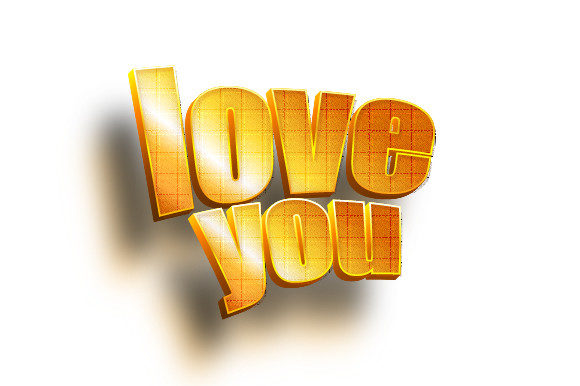
Creating a Love You 3D Text Design is more than just rendering letters with depth. It is a way to transform a simple, heartfelt message into a visually striking piece of art that feels tangible and memorable. Whether you are designing a digital greeting, a wall art piece, a social media graphic, or a personalized gift, the goal is the same: to make the words "Love You" stand out with presence and emotion. This guide walks through the practical side of designing, choosing tools, and applying three-dimensional typography so that your final piece resonates with both beauty and meaning.
Why Choose a 3D Approach for a Simple Message
At first glance, the phrase "Love You" is short and universal. But conveying genuine warmth through typography requires more than a standard font. A flat, two-dimensional rendering can feel distant or impersonal, especially in a digital space where viewers are accustomed to polished visuals. A Love You 3D Text Design adds physicality and depth, making the message appear as if it occupies real space. This visual weight helps the sentiment feel more grounded, sincere, and lasting.
Many adults face a common challenge: they want to express affection in a way that feels special, but they lack design skills or access to professional software. The good news is that creating convincing 3D text is no longer limited to experts. With the right approach, anyone can produce a design that looks polished and communicates genuine emotion.
Understanding the Core Components of 3D Text Design
Before jumping into software or techniques, it helps to understand what makes a Love You 3D Text Design effective. Three key elements work together to create the illusion of depth.
- Extrusion and beveling: This gives the letters thickness. Instead of a flat outline, each character gains sides that catch light and shadow. A subtle bevel softens the edges, while a sharper bevel creates a more geometric, modern look.
- Lighting and shading: Depth is only convincing when light interacts with the surfaces. A single directional light source creates highlights on one side and shadows on the other, making the text pop off the background.
- Material and texture: The surface appearance of the text matters. Glossy finishes reflect light and feel polished, while matte or textured surfaces offer a softer, more organic feel. For a love-themed design, a gentle gloss or a metallic sheen often works well.
Understanding these components helps you make intentional choices rather than relying on default settings. Whether you use a simple online tool or advanced software, controlling these three aspects will elevate your design.
Who Benefits from This Type of Design
The audience for Love You 3D Text Design is broader than you might think. Graphic designers and content creators use it for Valentine's Day campaigns, anniversary posts, and product packaging. But non-designers also find value. Someone planning a proposal might want a custom 3D text image to display on a screen or print as part of a surprise. A parent creating a birthday card for a child might use 3D text to make the message feel more playful. Even small business owners use this style for signage, banners, or promotional materials that need to convey warmth and care.
Each user approaches the topic differently. A beginner needs a straightforward tool with prebuilt templates and minimal learning curve. An intermediate user might want more control over materials and lighting. A professional seeks full customization, including camera angles, complex extrusions, and integration with other design elements. Recognizing where you fall on this spectrum helps you pick the right method and avoid frustration.
Practical Methods for Creating Your Own Design
There are several paths to creating a Love You 3D Text Design, and the best one depends on your comfort with technology and your desired outcome.
Using Online Generators and Browser-Based Tools
If you want a quick result without installing software, online 3D text generators are a solid option. Tools like Canva, Vectary, or Figma (with plugins) allow you to type your message, choose a font, adjust depth and color, and render a 3D image in minutes. The advantage is speed and ease. The trade-off is limited control. You may not be able to fine-tune lighting angles or add complex textures. However, for social media posts, e-cards, or simple print projects, these tools produce clean, attractive results.
Using Dedicated 3D Software
For those who want full creative freedom, software like Blender (free and open-source), Cinema 4D, or Adobe Dimension offers robust 3D typography tools. With these programs, you can extrude text, adjust bevel profiles, apply realistic materials, set up multiple lights, and render at high resolution. The learning curve is steeper, but the payoff is a design that looks truly professional and unique. You can also animate the text or integrate it into a scene with other 3D objects.
Using Mobile Apps for On-the-Go Design
Mobile apps like Phonto, InShot, or Pixlr offer basic 3D text effects that are perfect for quick edits. While the depth simulation is often more limited than desktop software, these apps are convenient for last-minute projects. You can overlay 3D-style text onto photos or backgrounds directly from your phone.
No matter which method you choose, always start with a clean, high-contrast background. A dark or neutral backdrop makes the 3D text stand out more clearly. Also, test the design at different sizes. A text that looks impressive on a phone screen may lose detail when printed large.
Design Choices That Strengthen the Message
The technical side of creating a Love You 3D Text Design is only half the equation. The aesthetic choices you make directly affect how the message is received.
Font selection: Script fonts with flowing curves can feel romantic and personal, but they can be harder to extrude cleanly because of overlapping strokes. Sans-serif fonts like round or soft geometric styles offer clarity and readability in 3D. Serif fonts add a classic, elegant feel. Avoid highly decorative fonts that lose legibility when depth is added. A good rule is to test the font in 2D first and then apply the extrusion. If the base shape is unclear, the 3D version will be worse.
Color palette: Traditional reds, pinks, and golds are popular for love-themed designs, but you are not limited to those. Soft pastels convey tenderness, while deep metallic tones like rose gold or copper add sophistication. Gradient fills on the extruded surfaces can add visual interest without overwhelming the text.
Background integration: The best designs treat the text as part of a larger scene. Instead of placing 3D text on a flat color, consider adding a subtle gradient, a soft bokeh effect, or a simple geometric pattern. The background should support the text, not compete with it.
Common Pitfalls and How to Avoid Them
Even experienced designers encounter issues when working with 3D text. Being aware of these common problems will save you time and frustration.
- Over-extrusion: Making the depth too large relative to the letter size can cause the text to look bulky or cartoonish. Aim for a depth that is roughly 20–30% of the letter height for a balanced look.
- Unreadable angles: A dramatic 3D camera angle can make the text exciting, but if the angle is too extreme, the message becomes hard to read. Keep the camera within 15–30 degrees of center for readability.
- Poor lighting: A single harsh light can create deep, distracting shadows. Use at least two light sources: a key light for the main illumination and a fill light to soften shadows. A rim light from behind can help separate the text from the background.
- Ignoring the environment: If your text casts a shadow, make sure the shadow direction matches the light source. A mismatched shadow breaks the illusion of depth.
These details matter because viewers subconsciously notice when something feels off. Taking the time to adjust lighting and camera angles makes your design feel intentional rather than automated.
Practical Applications and Real-World Outcomes
A well-executed Love You 3D Text Design can serve many purposes. For personal use, it makes a powerful centerpiece for a handmade anniversary card or a framed print. For digital use, it elevates a social media post or a video intro, giving it a polished, professional look. Small businesses, such as bakeries or florists, can use 3D text on promotional banners or window displays during Valentine's season. The depth and texture of 3D typography naturally draw the eye, making it an effective tool for grabbing attention in crowded spaces.
One practical outcome that many users appreciate is the ability to reuse and adapt the design. Once you have a Love You 3D Text Design in a layered file format, you can change the colors, background, or lighting to match different occasions. Swap the red for green, and the same 3D text works for a holiday greeting. Change the material to gold, and it becomes suitable for an anniversary. This flexibility makes the initial effort worthwhile.
Making Decisions Based on Your Skill Level and Goals
If you are new to design, start with an online generator and create a simple version of the phrase. Experiment with three different fonts and two color schemes. See which combination feels most authentic to the message you want to convey. Once you are comfortable, move to a tool like Canva or Vectary to explore bevel and lighting options. The goal at this stage is not perfection but understanding how depth changes the look of text.
If you are an intermediate user who already knows the basics of graphic design, try creating a Love You 3D Text Design in Blender or Adobe Dimension. Focus on material settings: try a glossy chrome look, then a soft velvet texture, and compare how each feels. Add a simple background element like a heart shape or a ring of light. You will learn more by iterating than by aiming for a final product on the first try.
For professionals, consider building a reusable template. Set up a scene with adjustable lighting, a camera preset, and material groups that can be swapped. This saves time on future projects and ensures consistency across different pieces. You can even incorporate particle effects, such as floating hearts or sparkles, to add motion and emotion to the static text.
Practical Considerations Before You Start
Before opening any software, define the output format. A design meant for a phone screen requires different resolution and aspect ratio than one intended for a printed poster. For print, aim for at least 300 dpi and consider the size of the text relative to the physical medium. For digital use, export in RGB color space and keep the file size manageable without sacrificing clarity.
Also think about the audience. A Love You 3D Text Design for a partner might use intimate, soft colors and a simple background. One for a public social media post might use brighter colors and a more dramatic angle to stand out in a feed. Matching the design to the context ensures the message lands as intended.
If you plan to use the design in video or animation, consider the motion path. A slow rotation or a gentle floating movement adds life to the text. Keep the motion smooth and avoid rapid changes that make the text hard to read.
Bringing It All Together
Creating a Love You 3D Text Design is a rewarding process that combines technical skill with emotional intent. By understanding the basic components of 3D typography, choosing the right tool for your skill level, and making deliberate design choices, you can produce a piece that communicates love in a visually compelling way. Whether you are a beginner making your first 3D text or a professional refining a template, the key is to keep the message at the center. The depth, lighting, and materials are there to serve the words, not overwhelm them.
Start with a clear idea of who will see the design and what feeling you want to evoke. Then, choose a method that fits your comfort level and time. Experiment with fonts, colors, and lighting. Test the result at different sizes and in different contexts. With each iteration, your Love You 3D Text Design will become more polished and more personal. And in the end, that personal touch is what makes the words truly meaningful.