Packaging Sleeve Box Dieline Template: A Practical Guide for Real-World Use
Think of the last time you received a product that felt special before you even opened it. Chances are, the packaging played a big role. Among the most versatile and understated packaging styles is the sleeve box: an outer sleeve that slides over an inner tray or product. The Packaging Sleeve Box Dieline Template is the digital blueprint that brings this design to life. It’s not just a set of lines on a screen — for designers, small business owners, and product managers, it’s the difference between a package that looks amateur and one that feels intentional.
When a Sleeve Box Makes Sense for Your Product
Sleeve boxes are everywhere once you start noticing them. They hold premium chocolates, boutique perfume sets, tech accessories, and even collectible card games. What makes them so popular is the reveal — the slow slide of the outer sleeve peeling away to show the inner product. That tactile moment matters. Anyone who has watched a customer receive a subscription box knows exactly what I mean: the sleeve box adds anticipation without being flashy.
For a small skincare brand launching its first three-product line, a sleeve box can hold individual jars while the sleeve carries the brand story. For a local artisan selling handmade soap sets, the sleeve box dieline template becomes a way to standardize packaging without hiring a structural designer. It’s a practical solution that scales from a kitchen-table business to a full retail launch.
The Subscription Box Scenario
Subscription boxes live and die by unboxing experience. A sleeve box dieline template allows you to create a consistent outer shell while the inner contents change monthly. The sleeve stays the same — same dimensions, same brand colors — but the inner tray can be swapped for different products. This is where the real-time flexibility of a dieline template shines. It doesn’t force you to redesign packaging every month. You just adjust the artwork inside the same folded structure.
One common observation: subscription brands that use sleeve boxes often have higher share rates on social media because the sliding motion is satisfying to film. The template’s structure — a four-panel sleeve with locking tabs — is simple enough for short-run digital printing yet robust enough for longer runs with offset. For someone starting a monthly snack box, that balance between low minimums and professional finish is critical.
For the Independent Designer or Freelancer
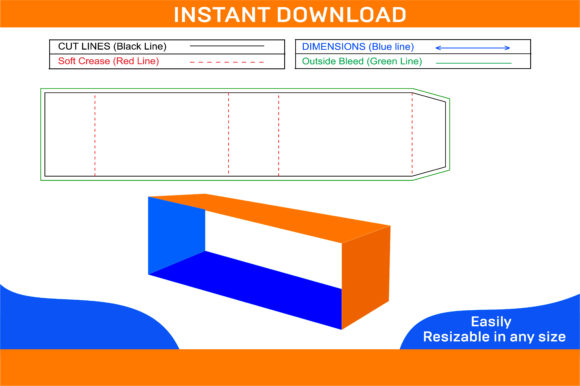
If you’ve ever been asked to design packaging for a client who has no idea what a dieline is, you know the struggle. A well-drafted sleeve box dieline template saves you hours of guesswork. You can drop it into Illustrator or InDesign, apply your artwork, and hand it to a printer with confidence. The key is understanding that the dieline accounts for paper thickness, fold allowances, and glue flaps. For a freelancer working with a local print shop, the template also helps communicate exactly where cuts and creases go, reducing back-and-forth emails about “what does this line mean?”
One practical tip: always check whether the template includes bleed and safety margins. Many generic templates online leave these out, and then the artwork gets trimmed off. A proper template will have a faint blue line indicating the safe zone, something you learn only after a bad print run.
For the E-Commerce Brand Scaling Up
Moving from poly mailers to branded boxes is a big step. A sleeve box dieline template lets you test packaging with a smaller order — maybe 200 units — before committing to a full pallet. The sleeve can be made from a lightweight paperboard if you’re shipping directly to customers, or a sturdier stock for retail shelves. The same template can adapt to different materials by simply adjusting the dieline’s gap allowances. For a brand that sells phone accessories, switching from a tuck-end box to a sleeve box immediately makes the product feel more premium, even if the manufacturing cost is similar.
However, there’s a nuance: sleeve boxes rely on friction to stay closed. If the sleeve is too loose, it slides off during shipping. If it’s too tight, customers struggle to open it. A good template accounts for paper grain direction and thickness. That’s not something you think about until you’ve had a batch of sleeves that just won’t stay put. For e-commerce brands, it’s worth asking the printer whether they adjust the die for the specific board you’re using.
The Sustainability Angle
Sleeve boxes often use less material than hinged-lid boxes because they don’t require extra side flaps for closure. For companies trying to reduce packaging waste, a sleeve box dieline template can be optimized to nest multiple sleeves on a single sheet, reducing trim waste. Some templates even include a tuck-lock mechanism that eliminates the need for glue, making the entire package recyclable without contamination. That’s a big deal for brands that market themselves as plastic-free. One eco-friendly coffee company I know uses a sleeve box with no glue, just interlocking tabs, and the template they started with was a simple dieline they modified from a free source.
Another real-world example: a children’s toy brand switched from windowed boxes to a sleeve with a cutout showing the product through the sleeve itself. Using the same basic dieline, they created a window by adding a knockout shape — no plastic needed. The template gave them the freedom to experiment without structural engineering costs.
What to Watch Out For
Not all sleeve box dieline templates are created equal. A template designed for a 2-inch-thick book won’t work for a flat jewelry case. You need to consider the depth of the inner tray or product. If the sleeve is too short, it won’t hold the contents securely. If it’s too tall, it looks empty inside. The measurement of the “back” panel (the side opposite the opening) is often overlooked — it needs to be long enough to prevent the sleeve from tipping forward when the inner tray is pulled out.
Also, think about the sleeve’s opening. Most templates use a cutout or thumb notch so the user can push the tray out. Without that, customers will turn the box upside down and shake it — not a great unboxing. A good template will include a small semi-circle at the opening edge. I’ve seen brands skip this to save cost, and it always feels frustrating.
Printing and Material Choices
The same dieline can look very different on 14pt cardstock versus 300gsm artboard. For rigid sleeker boxes, you might need a double-wall construction. Some dieline templates only work for thin paperboard prints because they rely on the material’s flexibility. If you plan to print on a heavier stock, seek a template that explicitly says “for rigid materials.” Many freebies online are designed for folding carton and will crack if you fold them with thick board.
Another consideration: sleeve boxes typically require precise scoring to fold cleanly. A cheap template might not indicate the difference between a score line (fold) and a cut line. For a small business sending out DIY template files to a print-on-demand service, that confusion can result in a box that doesn’t fold at all. I always recommend including a simple note: dashed lines are folds, solid lines are cuts.
Creative Freedom Within a Structure
One of the best things about a sleeve box dieline template is how much room it gives for creativity while still providing a reliable framework. You can wrap the sleeve in custom illustrations, use metallic foils, or let a pattern flow continuously around the four panels. Because the sleeve is a single printed piece that wraps around, you get a 360-degree canvas — unlike a box with a top lid where the sides are often separated by the lid’s edge.
For a craft brewery making limited-edition releases, a sleeve box dieline template became the canvas for a full-wrap illustration that told the story of the hops used. The bottle and glassware sat in a simple inner tray, and the sleeve became the collectible piece. That approach wouldn’t have been possible with a standard six-panel box.
Multi-Purpose Uses Beyond Retail
Sleeve box templates aren’t only for products. I’ve seen entrepreneurs use them for event gift bags, wedding favors, and corporate swag kits. Because the sleeve and tray can be separated, the recipient keeps the sleeve as a card or a holder, while the tray goes into recycling. For a brand doing a promotional campaign where they send out samples, the sleeve can include a QR code that leads to a tutorial — the template’s flat surfaces make it easy to print a scannable URL without distortion.
One limitation, though: sleeve boxes don’t stack well. If you’re shipping multiple units in a larger box, they might shift because the sleeve doesn’t lock to the tray. That’s fine for individual gifts but worth noting for fulfillment centers.
Final Thoughts on Choosing a Template
The best Packaging Sleeve Box Dieline Template is the one that matches your product’s dimensions, your printer’s specs, and your budget for testing. Start with a template that includes clear fold and cut lines, bleed margins, and a measure guide for the inner tray depth. Test a physical sample before ordering in bulk — even if that means printing on your home printer, cutting with a craft knife, and assembling by hand. That ten-minute test will tell you more than any PDF preview ever will.
For anyone who has ever struggled with package dimensions or had a printer say “your artwork doesn’t match our die,” using a standard dieline from a trusted source removes a huge chunk of friction. Whether you’re a solo maker, a design agency, or a growing brand, the template is not just a tool — it’s a starting point for creating packaging that people remember.