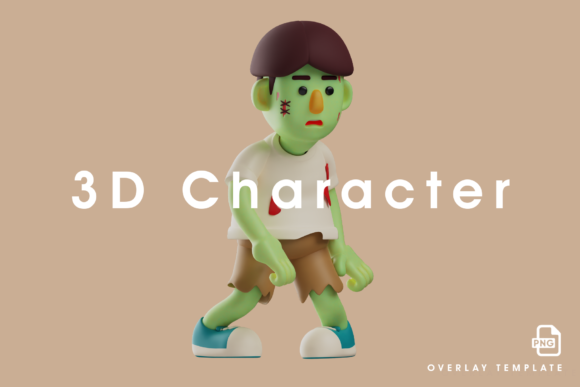
3D Zombie Design with Weird Poses
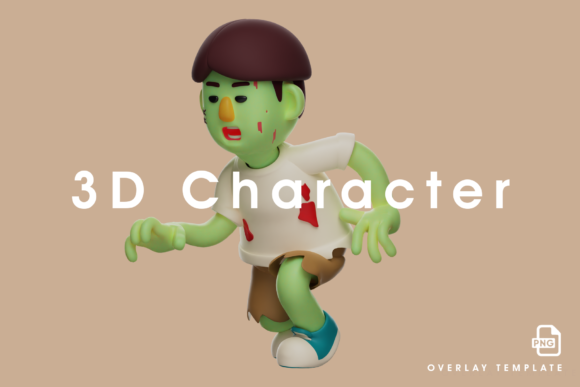
Creating 3D zombie characters is a staple in game development, animation, and visual effects. But the difference between a forgettable undead extra and a truly memorable monster often comes down to one thing: the pose. A standard shambling walk is expected, but a zombie contorted into an unnatural, weird pose can instantly communicate personality, history, or a specific threat. Designing 3D zombies with deliberately strange poses is not just about being quirky; it is a practical strategy that affects rigging, animation efficiency, storytelling, and even marketing. This article explores how to integrate this approach into your workflow, from pre-production through final asset delivery, and how it interacts with the tools and teams you already use.
Where Weird Zombie Poses Fit in a Creative Workflow
The concept of designing a zombie with an odd, physically improbable stance can be applied at several stages of a project. It is rarely a random choice, but rather a deliberate decision that serves a purpose. Before you begin modeling, consider what the pose communicates. Is the zombie frozen mid-lurch due to rigor mortis? Did it die in a fall, resulting in a twisted spine? Or is the pose a result of a unique infection that causes muscular spasms? Answering these questions early defines the model’s structure and saves rework later.
During the modeling phase, a weird pose forces you to think about anatomy and deformation. A standard T-pose or A-pose is safe for rigging, but a zombie with one shoulder dislocated and a leg bent backward demands a more thoughtful edge flow and topology. This upfront investment makes the actual rigging process smoother because the deformations are planned for, not patched in later. After the model is complete, the weird pose becomes a signature asset. It can be used as a hero character in a scene, a unique enemy type in a game, or a striking visual in promotional materials.
Before the Project: Planning and Asset Strategy
When you are in the early stages of a project, whether it is a short film, a game level, or a commercial, defining a range of zombie poses helps you allocate resources. Instead of modeling ten generic zombies and hoping they look different, plan three or four with truly weird poses. This reduces the total number of unique models needed because each pose creates a distinct silhouette. For a small studio or a solo freelancer, this is a huge efficiency gain. You get more visual variety from fewer assets, which directly impacts your production schedule and budget.
Pre-production is also the time to gather reference. Look at real-world deformities, contortionists, and even mannequins that have been twisted into unnatural shapes. These references ground your weird poses in something believable, making them creepy rather than cartoonish. Create a mood board that includes not just the pose, but also the implied story behind it. A zombie with a permanently twisted neck might have been in a car accident; one with a contorted spine might have died from a fall. This narrative layer adds depth without additional modeling work.
How This Approach Interacts with Other Tools and Methods
3D zombie design with weird poses does not happen in a vacuum. It interacts directly with your choice of software, rigging techniques, and even your team’s communication methods. If you use Blender, Maya, or Cinema 4D, the way you build topology for a weird pose will differ. For example, if you plan to use the model in a game engine like Unity or Unreal, you need to consider polygon budgets and LODs. A weird pose may require more geometry in certain areas, like joints, to prevent clipping during animation. Plan for this in the modeling stage rather than trying to fix it during optimization.
Rigging a zombie with a weird pose is where the real interaction happens. A standard biped rig may not work if the spine is curved in an unusual way. You may need to use custom joint placement, inverse kinematics with extra controls, or even a spline-based spine rig. The rigging artist needs to understand the intended pose from the start, so communication between modeler and rigger is critical. This is where a clear design document or an annotated turnaround becomes essential. The weird pose is not an afterthought; it is a constraint that shapes the entire technical setup.
Animation also benefits. If your zombie is already posed in an interesting way, the animator does not need to invent motion from scratch. The base pose suggests a range of movements. For example, a zombie with a tilted pelvis and one leg shorter than the other will naturally walk with a lopsided gait. The weird pose becomes the foundation for the animation, saving time and creating a more cohesive character. In a pipeline where animators are often under deadline, this kind of built-in character definition is valuable.
Practical Implementation Tips for Consistent Results
To integrate weird poses into your 3D zombie design workflow without causing chaos, follow a few practical guidelines. First, maintain a library of reference poses. This can be a folder of images, a set of simple blockouts, or even a collection of rigged base meshes that you can pose quickly. Having a starting point saves hours of trial and error. Second, use symmetry sparingly. A weird pose should look asymmetrical and organic. If you model one side and mirror it, you lose the very quality that makes the pose interesting. Work on the whole model in a natural, asymmetrical way, even if it means more manual work.
Third, test the pose early in the modeling process. Block out the basic shape and apply a temporary preview of the deformation before you commit to high-resolution detailing. If the pose looks awkward or breaks the silhouette, adjust it before you start adding textures and fine detail. This saves time and prevents disappointment later. Fourth, think about usability. A zombie with an extreme pose may be difficult to reuse in different contexts. If you are building a library for long-term use, consider creating modular zombies: a base body that can be posed in multiple weird ways using blend shapes or pose space deformation. This gives you flexibility while maintaining a consistent quality level.
Preparation and Compatibility Considerations
Before you start modeling, consider how the final asset will be used. If the zombie is for a real-time application, you need to ensure the weird pose does not cause intersection with other objects or the environment. For example, a zombie with an arm jutting out to the side may clip through walls or other characters. Plan for this by either adjusting the pose or designing the environment around it. If the zombie is for a pre-rendered scene, these constraints are looser, but you still need to think about camera angles and composition. A weird pose that looks amazing from one angle may look confusing from another. Test the pose from multiple views before finalizing.
Compatibility also extends to your asset pipeline. If you work with a team that uses a common rigging system, verify that your weird pose can be adapted to that system. You may need to create custom controls or additional blend shapes. Document these modifications so that other team members can work with the asset without confusion. This is especially important if the asset will be handed off to a different department or outsourced. Clear documentation reduces errors and rework.
Efficiency and Quality Control in Zombie Design
Designing 3D zombies with weird poses can actually improve efficiency if done systematically. Instead of modeling each zombie from scratch, you can create a base mesh with good topology and then use pose-based sculpting to create variations. This is faster than modeling each unique zombie individually and ensures a consistent level of quality. The base mesh should have enough edge loops around joints to allow for extreme deformations. Spend time on this base mesh because it will be the foundation for many characters.
For quality control, establish a set of criteria for what makes a weird pose effective. It should be physically implausible but visually readable. It should suggest a story without needing exposition. It should work with the intended rig and animation style. And it should not cause technical problems like polygon intersections or texture stretching. Review each zombie asset against these criteria before it moves to the next stage of the pipeline. This is especially important if you are producing assets for a client or a larger team. A consistent quality standard ensures that every weird pose serves a purpose and does not become a distraction.
Long-Term Use and Expanding Your Asset Library
One of the most practical benefits of designing zombies with weird poses is the long-term value of your asset library. A well-made zombie with a unique pose can be reused in different projects with minimal changes. You can adjust the texture, swap out some geometry, or modify the pose slightly to create a new character. This is especially useful for freelancers and small studios that need to maximize their return on investment. Over time, you build a collection of versatile assets that can be quickly deployed in new work.
To support long-term use, organize your zombie assets by pose type, deformation style, and intended use case. Tag them in your asset manager so you can find the right one quickly. If you use a modular approach, keep the base mesh and the pose data separate so you can combine them in different ways. This modularity also makes it easier to update your assets as your skills improve or as new software versions are released. A zombie with a weird pose that was created five years ago can still be relevant if the underlying structure is sound and the pose remains effective.
Integrating Weird Poses Into Your Routine
If you want to make weird poses a regular part of your 3D zombie design routine, start small. Pick one zombie in your current project and design it with a deliberately strange pose. Document what worked and what caused problems. Use that experience to refine your process for the next project. Over time, you will develop an intuitive sense for which poses are worth pursuing and which ones are more trouble than they are worth. This is a skill that improves with practice, just like any other aspect of 3D art.
Finally, share your work with other artists and get feedback. A weird pose can be subjective; what looks unsettling to you may not read the same way to someone else. Use feedback to calibrate your designs and ensure that your zombies are hitting the intended tone. By making this approach a deliberate part of your workflow, you turn a gimmick into a reliable tool for creating memorable, efficient, and high-quality 3D zombie assets.